Monday, May 28, 2012

Graduation Candy Gram

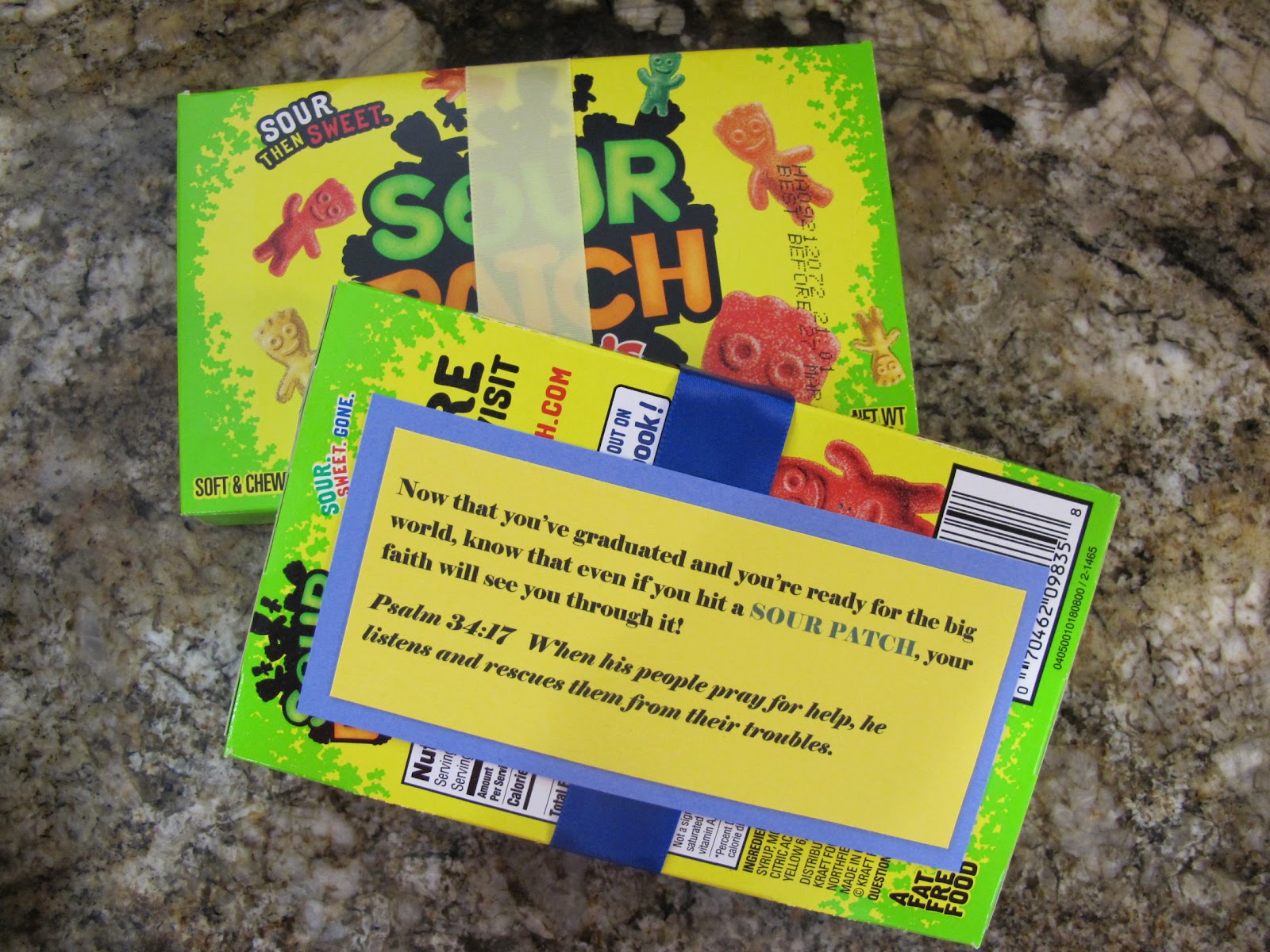
I made these cute graduation candy gifts for a few seniors graduating this spring. They turned out really cute! I had seen graduation candy cards on Pinterest but wanted to try something a little different by including bible verses as well. First I bought five different movie-sized candies, trying to think in advance what "punny" sayings I could make with them. Then I typed up my sayings and a coordinating bible verse for encouragement and printed it on card stock. I used blue and yellow for their school colors. I wrapped each box with ribbon too for an extra touch.


Sour Patch
(click on picture for a larger view and so you can read the pun and coordinating verse)


Milk Duds


Nerds


Reese's Pieces


Whoppers


 Then I wrapped them up in tissue paper and placed them in a gift bag. I made some graduation gift tags with the "A Child's Year" Cricut cartridge.


So easy and affordable too!
Here is a LINK to print the labels I created and used.

Sunday, May 13, 2012

Flower Pot Card

Here is a simple card that your kids can make for any occasion. We made them as Mother's Day cards but they would be great for a birthday, grandparent's day, and more!
We traced my daughter's hand on green construction paper and then cut out a flower pot shape free-hand. You could also use your Cricut to cut the flower pot shape if you have a cartridge with a flower pot cut but we were in a hurry!
We did use the Cricut to cut out the little flower shapes for the top of each finger and then my daughter finished each flower off with a fuzzy ball.
Happy Mother's Day!

Wednesday, May 18, 2011

Reusable Birthday Banner


Here are some pictures of a birthday banner I made for my daughter's 7th birthday party. I laminated each oval so the banner would survive several years of use. I have two daughters so this baby will get used plenty!

Friday, May 6, 2011

Mother's Day Card


The kids and I made these cute Mother's Day cards for the grandmas and great grandmas in our lives. We started with the My Community cartridge and cut out the spinner image in black.


Next they picked some colors for the wedges and we cut those out as well.


Time to assemble the spinner! (yes, that is a lizard on the table lending a helping hand)


The kids came up with some adjectives to describe their grandmas and labeled each wedge with a different adjective.


Then they attached the spinner to folded cardstock and wrote "I love you because you are..." at the top.


Super easy, super fun, and personal too!

Saturday, April 16, 2011

Cricut Easter Shirt

Spring is here and Easter is right around the corner! Time to get festive! Why not make a cute Easter shirt for your little ones with the Cricut?


Cutting fabric with the cricut can be a bit tricky. I got a lot of good tips from this video.

Supplies:
Plain t-shirt
Solid color fabric (I used purple)
Print fabric
Steam a Seam 2
Doodlecharms Cartridge (or other Easter image from your cartridges)
Buttons and ribbon (optional)


Begin by deciding how large you want your Easter basket to be. I decided to cut mine at 5 1/2" so I started with a 6" x 6" square of purple fabric and applied the Steam a Seam 2 to the back. Steam a Seam 2 is fusible web that comes in sheets with a paper backing on each side. You can buy it at your craft store.


Peel off one side of the paper backing, iron it onto your fabric, and leave the other paper backing on for cutting in your Cricut.


The Doolecharms cartridge has a basket and egg that are perfect for this project. Make sure your fabric is pressed securely to your cutting mat. Set your Cricut to multi cut, blade depth to 6, and pressure to max.  After my basket was cut, it looked like this.. not too pretty, but it still worked!


Next, apply the Steam a Seam 2 to the back of your printed fabric for the egg. I used a 3" x 3" square.


Then I cut the egg at 2 1/2". If you're using Doodlecharms, make sure you use the Real Dial Size button to get an egg cut at your desired size. Otherwise it was cut an egg much smaller but in proportion to a 2 1/2" basket.

Then I laid out my basket and egg on the shirt. I decided to add a little ribbon tied around the handle for an added cute detail! If you decide to do this, make sure you add it before you iron your fabric to your shirt.


Next step.. get your iron back out and start by ironing on the egg first..


Then add the basket!


I decided to sew on a few cute buttons to the front of the basket to give the shirt a little more detail. And here is the finished product!

Happy Easter everyone!

Saturday, April 2, 2011

Springy Felt Headband

I love this project for the simplicity of it. From start to finish it took us about 30 minutes. As a busy mom I'm always looking for fun easy projects that I can complete with my kids for minimal cost and minimal mess.

Supplies:
Stiffened felt
Button
Headband
Needle and thread
Cricut cartridge of your choice
Hot Glue Gun

I started by letting my daughter pick out a shape to use as the decoration for the headband. She wanted a flower and chose the blossom off of the Walk in My Garden cartridge (page 87).


Next we placed a sheet of stiffened felt on our cricut mat. Stiffened felt works best because it has a starchy feel to it and stays in place better while being cut by the cricut.


We cut our first flower at 2". I had my blade depth set at 6, pressure on max, and speed on low. Also, be sure to use the muti cut button so that the shape is cut out twice and the blade passes through the felt completely.

Next we cut out another flower in a different color at 1 1/2".


Then we sewed the two flowers and a button together with needle and thread. This was a great opportunity for my daughter to work on her sewing skills.

The finished embellishment


And lastly, we hot glued the flower onto a headband! The options are endless with this project. You could attach these felt flowers to barrettes, key chains, even your Cricut cards or scrapbook pages. My other daughter is excited about making one too and I'm sure hers will turn out totally different since the options are endless!


Thursday, March 17, 2011

Flashcard Pocket Folder

I am the proud mama of a first grader and therefore, math flashcards are a necessary part of our life. Flash cards can get quite monotonous. Sometimes I don't know who is more tortured by them; me or my daughter. So in an effort to put a fun spin on the necessary evils of first grade, I decided to make a flashcard pocket folder where instead of simply reciting her math facts, she can now sort them in this fun, colorful folder game.

Let's get started!

I used the Walk In My Garden cartridge to cut 10 foundation envelopes at 7". Your envelopes may have to vary in size depending on the size of your flashcards. Our math curriculum in Saxon and 7" envelopes worked perfect.


 Below is the envelope before folding.


In order to make it easier for my daughter to insert and remove her flashcards, I cut the tops off the envelopes, making them  3 1/2" tall after folding.


Here is my rainbow of folded folders. Aren't they pretty? :)


Next step, cutting the numbers for the little folders. I LOVE the Sesame Street Font cartridge! I was getting a bit fed up with the thin, delicate font cartridges I had and heard this was a good one to try. The numbers and letters are fun and chunky and so easy to work with. I cut the numbers at 2" and gave each one a black shadow to make them pop. Then I glued the ten folders to a file folder... and voila!


A closer look at how it works..


My daughter will be using this for the subtraction facts she currently working on. But next year I will have a kindergartner and she too will be able to use the same folder for her simpler addition facts.